What's new
  • SNBForums Code of Conduct

    SNBForums is a community for everyone, no matter what their level of experience.

    Please be tolerant and patient of others, especially newcomers. We are all here to share and learn!

    The rules are simple: Be patient, be nice, be helpful or be gone!

Skynet Skynet v8 - Router Firewall & Security Enhancements

Skynet v8.0.6 does not start, see syslog:
Edit: I'm using the custom block list from @SomeWhereOverTheRainBow
Skynet is running according to your log:
Code:
kernel:DROP
messages. Is it just the ui failing?
I don't recall seeing any start-success messages for Skynet in my own logs, but I don't really look at them unless there's a problem.
 

Attachments

  • Unbenannt.png
    Unbenannt.png
    180.7 KB · Views: 55
Skynet v8.0.6 does not start after a reboot, see syslog:
Edit: I'm using the custom block list from @SomeWhereOverTheRainBow
Skynet exits because it can’t see that you’re connected to the internet yet.
Code:
Nov 22 10:53:28 Skynet: [â] Connection Error Detected - Unable To Reach Gateway (10.4.0.250) Or Public IP
There’s even a connmon message later.
Code:
Nov 22 10:54:29 connmon_[5798]: Ping test to '9.9.9.9' from connmon failed.
Can you ping 1.1.1.1, 10.4.0.250, or 9.9.9.9 from the router?

Do you have multiple default gateways with ppp?
Code:
route -n | grep "^0\.0\.0\.0"
 
Thanks for the answer and tips.

Druing normal operation and after manually restarting Skynet:
admin@RT-AX88U-ABE8:/tmp/home/root# route -n | grep "^0\.0\.0\.0"
0.0.0.0 10.4.0.250 0.0.0.0 UG 0 0 0 ppp0
0.0.0.0 192.168.2.1 0.0.0.0 UG 2 0 0 eth0

After a reboot of the router, I cannot ping 1.1.1.1, 10.4.0.250, or 9.9.9.9 from the router or PC.
I guess Skynet is blocking something?
Although I can surf the internet on my PC.
admin@RT-AX88U-ABE8:/tmp/home/root# route -n | grep "^0\.0\.0\.0"
0.0.0.0 10.4.0.250 0.0.0.0 UG 0 0 0 ppp0
0.0.0.0 192.168.2.1 0.0.0.0 UG 2 0 0 eth0

After I manually restart Skynet through the menu, I can ping 1.1.1.1, 10.4.0.250, or 9.9.9.9 again from both the router and PC.
Weird...

Edit: I've attached the debug info from Skynet during its "fail state".

 

Attachments

Last edited:
Thanks for the answer and tips.

Druing normal operation and after manually restarting Skynet:
admin@RT-AX88U-ABE8:/tmp/home/root# route -n | grep "^0\.0\.0\.0"
0.0.0.0 10.4.0.250 0.0.0.0 UG 0 0 0 ppp0
0.0.0.0 192.168.2.1 0.0.0.0 UG 2 0 0 eth0

After a reboot of the router, I cannot ping 1.1.1.1, 10.4.0.250, or 9.9.9.9 from the router or PC.
I guess Skynet is blocking something?
Although I can surf the internet on my PC.
admin@RT-AX88U-ABE8:/tmp/home/root# route -n | grep "^0\.0\.0\.0"
0.0.0.0 10.4.0.250 0.0.0.0 UG 0 0 0 ppp0
0.0.0.0 192.168.2.1 0.0.0.0 UG 2 0 0 eth0

After I manually restart Skynet through the menu, I can ping 1.1.1.1, 10.4.0.250, or 9.9.9.9 again from both the router and PC.
Weird...

Edit: I've attached the debug info from Skynet during its "fail state".

Skynet never loads it rules so something else is blocking your connection.

Code:
    start)
        Check_Lock "$@"
        Log info "Startup Initiated... ( $(echo "$@" | sed 's~start ~~g') )"
        Unload_Cron "all"
        Check_Settings
        Check_Files firewall-start services-stop service-event post-mount unmount
        Clean_Temp
        if ! Check_Connection 10 5; then echo; exit 1; fi

When you “restart” Skynet it actually restarts the whole firewall service which explains your connection suddenly working.
 
This change is now live. For anyone with lock file issues, try a reboot first as there may be stale processes from previous versions holding you out.
Thank you, blocking IoT devices works again after applying the latest patch.
 
Thank you, blocking IoT devices works again after applying the latest patch.
I have the same issue with IoT blocking. How do I apply this patch? Using option 10 Update Skynet didn't fix the issue. Using Skynet Version; v8.0.6 (21/11/2025) (429326934c250a3d0e5b39b2f6403959)
 
I have the same issue with IoT blocking. How do I apply this patch? Using option 10 Update Skynet didn't fix the issue. Using Skynet Version; v8.0.6 (21/11/2025) (429326934c250a3d0e5b39b2f6403959)

Under option 10, did you try the "force reinstall" option?
 
Hello John, thank you for the quick response. Today I decided to do a full reinstall of amtm, Diversion, Skynet and uiDivStats to see if that fixed the issue. I used a brand new USB 3.0 stick, did a format, a reset of amtm and reinstalled everything from scratch. I think I selected the diversion repro after the reset of amtm. Everything works like a charm. Then I entered the IoT IP address of my printer. I then got the IPTables Rules Failed, even after waiting several minutes. I rebooted the device but still got the failure. I did a full uninstall/install and still got the failure. I also did a force reinstall of Skynet after a new install. The problem remains.
Is it possible that I'm using a repository that isn't updated by the fix?

Details:
Router Firewall And Security Enhancements
By Adamm - https://github.com/Adamm00/IPSet_ASUS
21/11/2025 - v8.0.6
Router Model; RT-AX88U
Skynet Version; v8.0.6 (21/11/2025) (429326934c250a3d0e5b39b2f6403959)
iptables v1.4.15 - (eth0 @ X.X.X.X)
ipset v7.6, protocol version: 7
IP Address; (X.X.X.X)
FW Version; 388.10_2 (Oct 31 2025) (4.1.51)
Install Dir; /tmp/mnt/SanDisk-Rtr/skynet (51.2G / 56.1G Space Available)
SWAP File; /tmp/mnt/SanDisk-Rtr/myswap.swp (2.0G)
 
Under option 10, did you try the "force reinstall" option?
See above. The details of amtm:
amtm 6.1.5 by thelonelycoder
RT-AX88U (aarch64) Kernel-4.1.51
FW-3004.388.10_2 @ X.X.X.X
Operation Mode: Wireless router
Sun Nov 23 20:33:25 MEZ 2025
amtm - the Asuswrt-Merlin Terminal Menu
/mnt/SanDisk-Rtr Size 56.1G Used 2.1G (4%)
 
I have the same issue with IoT blocking. How do I apply this patch? Using option 10 Update Skynet didn't fix the issue. Using Skynet Version; v8.0.6 (21/11/2025) (429326934c250a3d0e5b39b2f6403959)
That looks good to get the patch for IOT

Here is mime...

Router Model; GT-BE98_Pro
Skynet Version; v8.0.6 (21/11/2025) (429326934c250a3d0e5b39b2f6403959)
iptables v1.4.15 - (vlan4094 @ 192.168.1.1)
ipset v7.6, protocol version: 7
 
I then got the IPTables Rules Failed, even after waiting several minutes
Post the debug output when it’s in the Failed state. Do you have an OpenVPN Server enabled on the router?
Code:
firewall debug info
 
Last edited:
For now, you can verify if they are there with ipset -L Skynet-Whitelist | grep nofilter

The Diversion whitelist will be visible only in the dnsmasq.conf.add file as domains for dnsmasq to populate IPs in the whitelist ipset.
Sorry for the late reply... I updated to the latest version (8.06) and it appears now that I can whitelist single IP addresses. I chose save and refresh entries before viewing my whitelist, I also turned off CDN whitelisting which made it easier to view my white list.

However when I ran the command:

Code:
ipset -L Skynet-Whitelist | grep nofilter

It came back blank before and after the update. I'm guessing this may have been the incorrect syntax? Running the command with no grep shows the entire whitelist.

One thing of note, and I'm not sure how this is supposed to work, I don't see anything from the Diversion whitelist. In case it's supposed to show those entries in the whitelist as well...

Thanks guys, this is great!
 
Post the debug output when it’s in the Failed state. Do you have an OpenVPN Server enabled on the router?
Code:
firewall debug info
I have a WG server running on the router and an OpenVPN client enabled in combination with VPN Director. I'll run the test to produce the debug log.
 
Post the debug output when it’s in the Failed state. Do you have an OpenVPN Server enabled on the router?
Code:
firewall debug info
So I did a decent test. When I started Skynet was running and IOT Blocking was Disabled. Everything else is as default. Did not change any setting since I'm uninstalling and installing it a lot. I check the firewall debug info. Everything is green.
Then I enabled IOT Blocking using a single IP address from my printer, I exit Skynet and returned to Skynet to get a refresh of the status. I got the error IPTables Rules Failed. I then run the debug command again. The only changes from the debug was that IPTables Rules turned to red with Failed and stated: 17/18 Tests Sucessful. IOT Blocking turned yellow with Enabled and stated: [*] Rule Integrity Violation - [ #11 ]. The rest was green.
When I tried to disable IOT Blocking again so everything starts working it states: [*] Skynet Not Running - Exiting.
I needed to uninstall Skynet and install it again to run Skynet with default settings again.
 
So I did a decent test. When I started Skynet was running and IOT Blocking was Disabled. Everything else is as default. Did not change any setting since I'm uninstalling and installing it a lot. I check the firewall debug info. Everything is green.
Then I enabled IOT Blocking using a single IP address from my printer, I exit Skynet and returned to Skynet to get a refresh of the status. I got the error IPTables Rules Failed. I then run the debug command again. The only changes from the debug was that IPTables Rules turned to red with Failed and stated: 17/18 Tests Sucessful. IOT Blocking turned yellow with Enabled and stated: [*] Rule Integrity Violation - [ #11 ]. The rest was green.
When I tried to disable IOT Blocking again so everything starts working it states: [*] Skynet Not Running - Exiting.
I needed to uninstall Skynet and install it again to run Skynet with default settings again.

I've pushed v8.0.7 which fixes wireguard server detection logic.
 
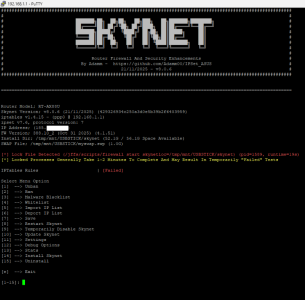
Is that a normal behaviour, that after every reboot, Skynet detects a lock file?
Nov 26 04:13:46 Skynet: [✘] Lock File Detected (/jffs/scripts/firewall start skynetloc=/tmp/mnt/USBSTICK/skynet) (pid=2410, runtime=3s) - Exiting
 
Last edited:

Latest threads

Support SNBForums w/ Amazon

If you'd like to support SNBForums, just use this link and buy anything on Amazon. Thanks!

Sign Up For SNBForums Daily Digest

Get an update of what's new every day delivered to your mailbox. Sign up here!
Back
Top